
For a full overview of pricing, refunds and billing security, see our Payments & Tokens Guide.
How do I purchase or add tokens?
- On Mobile: Tap the 'ADD TOKENS' button or + symbol at the top right.
- On Desktop: Click the 'ADD TOKENS' button near the top right, or select Buy Tokens from the dropdown menu.
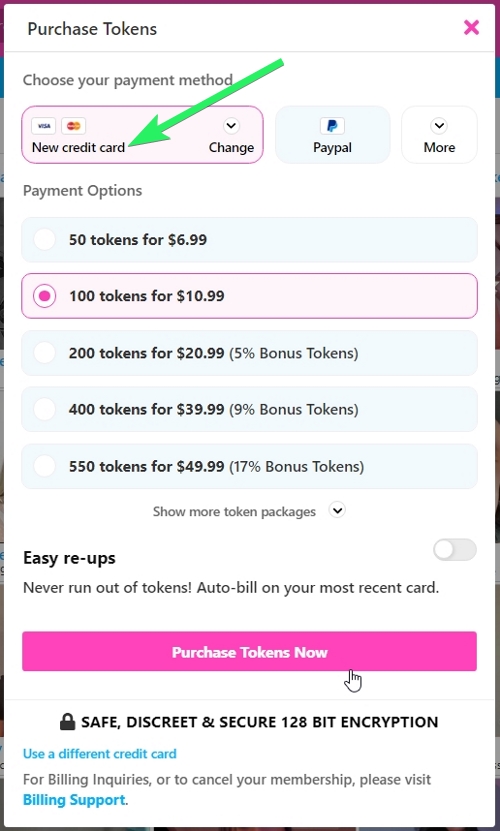
- Choose your payment method and token package.
- Tap the Purchase Tokens Now button to proceed and complete your purchase
- If your account is Token Credit enabled, you'll be able to spend tokens up to a daily limit and be charged later. You'll need to enter card information before you're able to spend any tokens. If you would like to increase your daily limit, navigate to Settings > Daily Spending Limit to make a change. Note: Special offers are only for new members and may be redeemed only once. We have systems in place to detect repeat attempts at taking advantage of special offers.
How much do tokens cost?
Typical token packages are as cheap as $0.08/token:
- 50 tokens for $6.99
- 100 tokens for $10.99
- 200 tokens for $20.99 (5% Bonus Tokens)
- 400 tokens for $39.99 (9% Bonus Tokens)
- 550 tokens for $49.99 (17% Bonus Tokens)
- 800 tokens for $69.99 (20% Bonus Tokens)
- 1,205 tokens for $99.99 (24% Bonus Tokens)
- 3,100 tokens for $249.99 (27% Bonus Tokens)
Exact prices vary by country (VAT, currency exchange, local laws). Users see their final price on the checkout page.
What accepted payment methods are available?
- Visa
- Mastercard
- PayPal
- Crypto (Bitcoin, Ethereum, etc.)
- Discover Card
- iDeal
- Pay Via Bank
- PaySafeCard
- Mister Cash
- BLIK
- Sofort Banking
- PIX
- Pay By Bank
- EPS - Online-Uberweisung
- JCB
- Przelewy 24
- Euteller
- Maestro
- Gift Cards from Aeropostale
- Gift Cards from Ann Taylor
- Gift Cards from Apple Store (not iTunes)
- Gift Cards from Athleta
- Gift Cards from Banana Republic
- Gift Cards from Barnes & Noble
- Gift Cards from Bass Pro Shops
- Gift Cards from Bath & Body Works
- Gift Cards from Bed Bath and Beyond
- Gift Cards from Best Buy
- Gift Cards from Buy Buy Baby
- Gift Cards from Cabela's
- Gift Cards from Callaway Golf
- Gift Cards from Cato
- Gift Cards from CB2
- Gift Cards from Costco
- Gift Cards from Crate & Barrel
- Gift Cards from Dick's Sporting Goods
- Gift Cards from Dillard's
- Gift Cards from DSW
- Gift Cards from Gap
- Gift Cards from Giant Eagle
- Gift Cards from Golf Galaxy
- Gift Cards from Guitar Center
- Gift Cards from Home Depot
- Gift Cards from Hotels.com
- Gift Cards from JCPenney
- Gift Cards from Jos. A. Bank
- Gift Cards from Kohl's
- Gift Cards from LOFT
- Gift Cards from Lowe's
- Gift Cards from Men's Wearhouse
- Gift Cards from Newegg
- Gift Cards from Nike
- Gift Cards from Office Depot
- Gift Cards from Office Max
- Gift Cards from Old Navy
- Gift Cards from Overstock
- Gift Cards from Peet's Coffee & Tea
- Gift Cards from Pottery Barn
- Gift Cards from Puma
- Gift Cards from REI
- Gift Cards from T.J. Maxx
- Gift Cards from Target
- Gift Cards from Tiffany & Co.
- Gift Cards from ULTA
- Gift Cards from Victoria's Secret
- Gift Cards from Walmart
- Gift Cards from West Elm
- Gift Cards from Whole Foods
- Gift Cards from Williams-Sonoma
- Gift Cards from Yankee Candle
- Bank Wire Transfer
- Money Order
Available payment methods may vary by location. Token packages and prices are subject to change.
Additional Information:
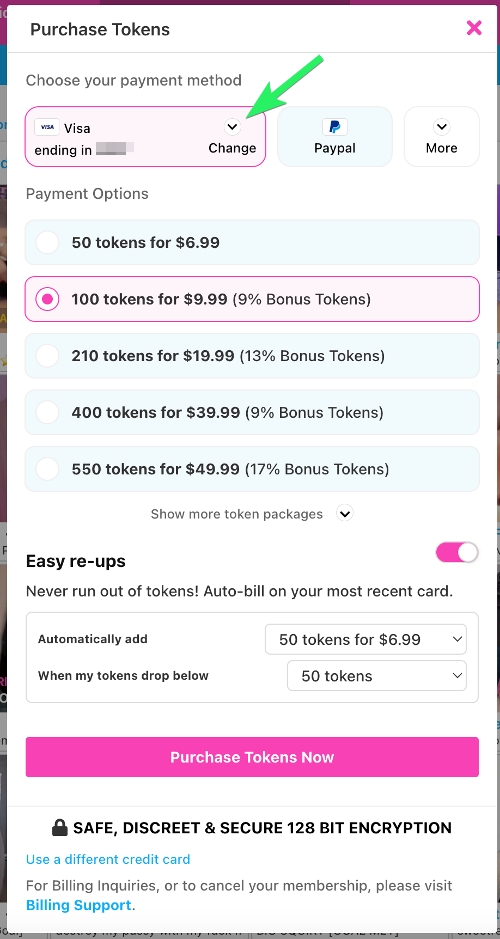
- Easy Re-ups: Set up auto-replenishment to avoid running out of tokens, such as when you're engaged in a private session with your favorite models. Toggle the option during purchase to select your preferred token package. Toggle also available via Settings > Settings & Privacy > Easy Re-ups.
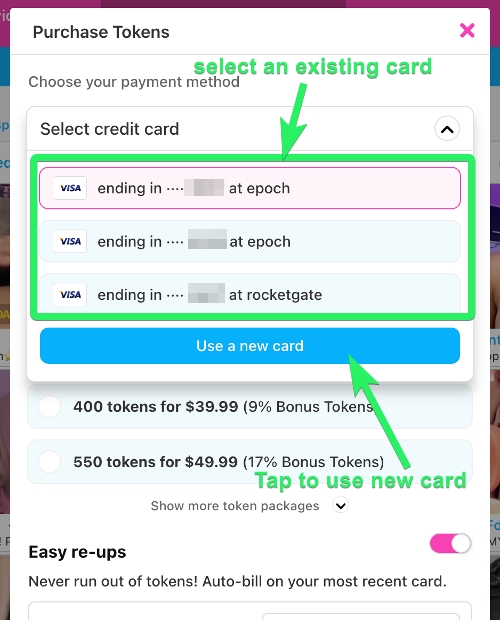
- Changing/Adding Cards: To use a different card, click the Credit Card selector and tap a different card on file, or tap "Use a new card," select your token package, and you'll be prompted to enter new card information on the next page. You may also select Add New Card on your Billing History page.
My purchase was declined, what can I do?
If your purchase has been declined, please contact our Customer Support team at [email protected] for further assistance. If you need to contact your biller directly, you may find a list of support contacts here.
I still need more information.
No problem! See if we answered your question in our CamSoda Payments & Tokens Guide.